Updated:
29.9.2026
You’re on the tools, your phone goes off, and a lead comes through. That’s Builderscrack working for you. Last year it happened 103,676 times across NZ: a homeowner asking for a tradie every five minutes. The question is whether you’re set up to get your share of it.
Here’s how the system works, what you can do to improve your chances, and how BC keeps finding you work even when you’re on the tools.
How leads work on Builderscrack
When a job goes up on Builderscrack, it doesn’t go to every matching tradie at once. BC sends it out in waves by trade and location. If enough tradies chase it in the first wave, it stops there, giving homeowners a good experience and keeping competition limited. If not, it goes to the next batch.
This works in your favour in two ways. Homeowners get a manageable number of tradies to choose from rather than being overwhelmed, and a homeowner who isn’t overwhelmed is more likely to make a selection. And because BC caps the total number of tradies who can chase any given job, the leads you do receive are worth more. Fewer tradies chasing the same work means a better chance of winning it.
If you’ve ever seen a lead come through but couldn’t chase it, it’s because enough tradies had already chased it in the first wave. That’s the system working as it should, keeping competition manageable for everyone.
The distribution itself uses a round-robin method, so every tradie gets their fair turn at being in the first wave. It doesn’t matter how long you’ve been on the platform. But a few things can influence how quickly leads come your way: your review score, how engaged you are on the platform, and whether your trade licences and insurance are current and showing under your Credentials.
How to make sure you’re getting the right leads
The leads Builderscrack sends you are only as good as the settings behind them. BC delivers targeted leads directly to you based on your trades and locations, so getting your settings right is what makes that targeting work in your favour. Even though you set these up when you first joined, they’re worth revisiting.
Trade categories. Select every trade you work across on your account. Each category gives you a separate rotation and more chances at work. BC tracks your review score per category separately, so it’s worth building your reviews in your strongest trade first before branching out into others.
Trade licence and insurance. These feed into how the platform ranks you. If you have a trade licence or an insurance policy that doesn’t show on your profile, you’re leaving something on the table; they’re simply signals that you’re a professional who’s ready and able to do good work.
Engagement. If you’ve been through a busy period on a big job or taken time off, your engagement signal drops. The best thing to do here is to put your account on pause. Once you get back into a regular rhythm of chasing leads, it re-establishes that signal. The platform is built to give every tradie a fair shot, but it rewards the ones who show up consistently.
Why leads slow down at certain times of year
Seasonal dips are normal and affect every tradie on the platform. Outdoor trades tend to go quiet over the cooler months as homeowners hold off on exterior work, and most categories see a dip over Christmas and New Year while people are on holiday.
If things feel quiet, it’s more likely the market than your profile. Use the downtime to top up your reviews, check your trade categories are set up correctly, and make sure your credentials are current, so you’re ready to go the moment things pick up.
How to chase jobs and improve your chances
Getting the lead is one thing. What you do with it determines whether you end up in front of the homeowner.
Be quick when you can. Leads are sent to tradies in real time, and popular jobs can fill fast. If there are hours you don’t want to be interrupted, Quiet Hours let you pause invites for that window under Settings > Leads, but it’s a genuine trade-off. BC holds your invite and sends it once your Quiet Hours end, and only if the job hasn’t already received enough interest elsewhere. If being first to respond matters to you, that’s worth weighing up when you set them. You can also speed up your response time by downloading the Builderscrack app so you’re notified the moment a lead comes in.
Use your Chase Intro. When you chase a job, you have the option to send a Chase Intro: a short structured form covering things like your availability for a site visit, how long the job might take, and whether a call-out fee applies. It appears at the top of your profile when the homeowner is deciding who to connect with. It’s optional, but it’s your first communication with that homeowner before they’ve even chosen to talk to you.
Decline leads you’re not interested in. If a lead comes through and it’s not right for you, actively declining it is better than ignoring it. Even saying no counts as engagement; the system rewards tradies who show up regularly, and responding to a lead, even to decline it, shows you’re active.
Stay active. Tradies who regularly chase leads are seen as more engaged by the platform. The more consistently you show up, the better your position in the matching system over time.
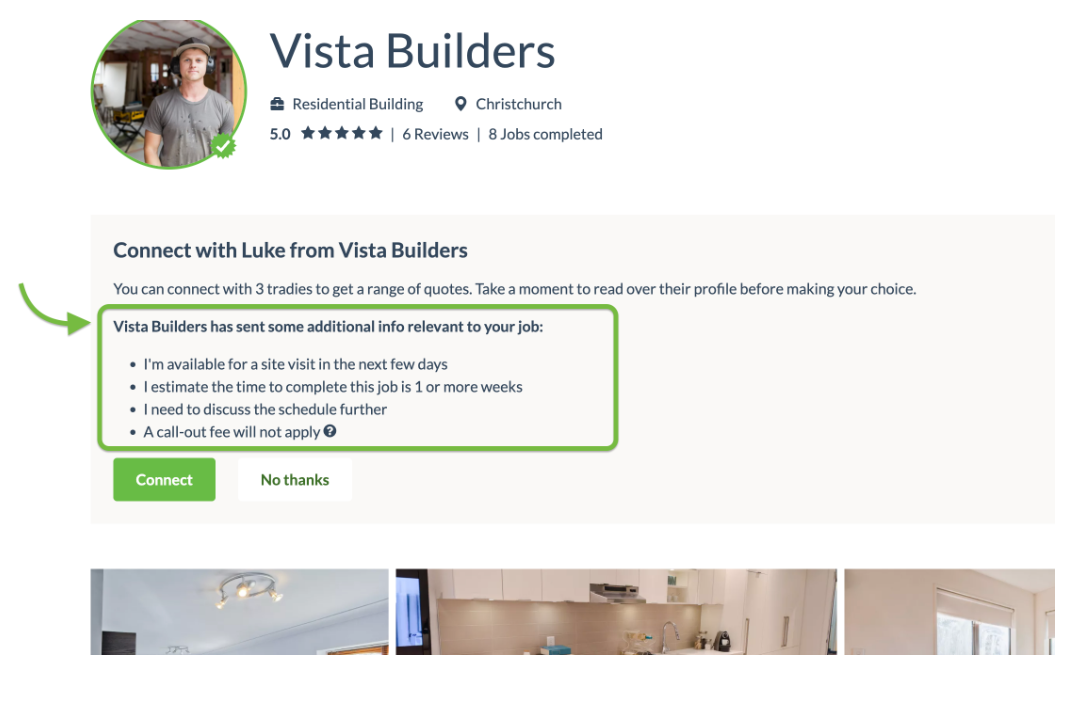
How a Chase Intro appears to a homeowner on BC before they decide who to connect with.
How to get found even when you’re not chasing
Builderscrack isn’t just a lead generation platform. Behind every lead that comes through is 19 years of brand building, search ranking, and marketing that brings homeowners to BC in the first place. You’re not advertising or cold calling. The work comes to you because BC has done the groundwork to make Builderscrack the name Kiwis reach for when something needs doing.
That extends beyond posted jobs too. Your profile shows up in the Builderscrack directory and in Google search results, which means homeowners can find you directly, even when they haven’t posted a job yet.
A homeowner searching for a plumber in Dunedin, or a builder in the Waikato, can land on your BC profile from Google without ever going through the job posting flow. That’s your profile working while you’re on the tools, bringing in enquiries you didn’t have to chase.
The stronger your profile, the harder it works. A clear photo, strong business description, recent project photos, and up-to-date credentials all help. But your reviews matter here too, not just the ones from BC jobs.
You can import your Google reviews directly to your profile, and Open Reviews lets you share a unique link with past clients so they can leave a review for work completed outside the platform. Both appear in their own clearly labelled sections, adding to the picture a homeowner sees alongside your verified BC reviews. If you’re newer to the platform or most of your work has come through word of mouth, this is a straightforward way to bring your existing reputation with you.
You can also share your BC profile link directly with past clients, post it on your socials, or embed it on your website. Your reputation doesn’t start and end with BC, and your profile shouldn’t either.
Why the work is worth showing up for
Whether you’re new to BC, coming back after time away, or already getting leads and want more, this is the whole idea behind Builderscrack: let work find you. Every lead is deliberately delivered to your inbox, and every job you do well compounds into the next one.
The tradies who get the most out of it are the ones who show up consistently when it counts: chasing leads, staying on top of their settings, and building a reputation that works for them.
Keep your profile current, show up when it counts, and let BC do the rest.